Using certbot for automatic HTTPS
Apparently, Porkbun renews its SSL certificate every 75 days according to their Knowledge Base. This means that I need to download their SSL bundle every now and then.
Since I run my own server, they suggest me to use certbot instead.
This is a tutorial on setting up certbot in case of me forgetting how to do it.
Setup
-
SSH to the server:
ssh personal-server -
Update the server:
apt update && apt upgrade -
Install certbot and nginx plugin:
apt install certbot python3-certbot-nginx -
Run certbot with nginx option:
certbot --nginxThis will prompt you with several questions for setting up certificate:
Saving debug log to /var/log/letsencrypt/letsencrypt.log
Enter email address or hit Enter to skip.
(Enter 'c' to cancel): [REDACTED]

- - - - - - - - - - - - - - - - - - - - - - - - - - - - - - - - - - - - - - - -
Please read the Terms of Service at:
https://letsencrypt.org/documents/LE-SA-v1.8-July-06-2026.pdf
You must agree in order to register with the ACME server. Do you agree?
- - - - - - - - - - - - - - - - - - - - - - - - - - - - - - - - - - - - - - - -
(Y)es/(N)o: Y

- - - - - - - - - - - - - - - - - - - - - - - - - - - - - - - - - - - - - - - -
Would you be willing, once your first certificate is successfully issued, to
share your email address with the Electronic Frontier Foundation, a founding
partner of the Let's Encrypt project and the non-profit organization that
develops Certbot? We'd like to send you email about our work encrypting the web,
EFF news, campaigns, and ways to support digital freedom.
- - - - - - - - - - - - - - - - - - - - - - - - - - - - - - - - - - - - - - - -
(Y)es/(N)o: N
Account registered.

Which names would you like to activate HTTPS for?
We recommend selecting either all domains, or all domains in a VirtualHost/server block.
- - - - - - - - - - - - - - - - - - - - - - - - - - - - - - - - - - - - - - - -
1: islabre.fyi
- - - - - - - - - - - - - - - - - - - - - - - - - - - - - - - - - - - - - - - -
Select the appropriate numbers separated by commas and/or spaces, or leave input
blank to select all options shown (Enter 'c' to cancel): 1
Requesting a certificate for islabre.fyi

Successfully received certificate.
Certificate is saved at: /etc/letsencrypt/live/islabre.fyi/fullchain.pem
Key is saved at:         /etc/letsencrypt/live/islabre.fyi/privkey.pem
This certificate expires on 2026-10-09.
These files will be updated when the certificate renews.
Certbot has set up a scheduled task to automatically renew this certificate in the background.

Deploying certificate
Successfully deployed certificate for islabre.fyi to /etc/nginx/conf.d/personal-website.conf
Congratulations! You have successfully enabled HTTPS on https://islabre.fyi

- - - - - - - - - - - - - - - - - - - - - - - - - - - - - - - - - - - - - - - -
If you like Certbot, please consider supporting our work by:
* Donating to ISRG / Let's Encrypt:   https://letsencrypt.org/donate
* Donating to EFF:                    https://eff.org/donate-le
- - - - - - - - - - - - - - - - - - - - - - - - - - - - - - - - - - - - - - - -
My nginx config file after setting up certbot:
server { listen 443 ssl; server_name islabre.fyi; ssl_certificate /etc/letsencrypt/live/islabre.fyi/fullchain.pem; # managed by Certbot ssl_certificate_key /etc/letsencrypt/live/islabre.fyi/privkey.pem; # managed by Certbot location / { root /var/www/html/Personal-Website; } } -
Making sure that
certbot.timeris enabled:root@personal-server:~# systemctl status certbot.timer ● certbot.timer - Run certbot twice daily Loaded: loaded (/usr/lib/systemd/system/certbot.timer; enabled; preset: enabled) Active: active (waiting) since Sat 2026-07-11 01:09:46 UTC; 10min ago Invocation: ea48fa3a23754f538c796ca66c054c4a Trigger: Sat 2026-07-11 17:31:45 UTC; 16h left Triggers: ● certbot.service Jul 11 01:09:46 personal-server systemd[1]: Started certbot.timer - Run certbot twice daily. -
Reloading nginx:
systemctl restart nginx -
Go to https://islabre.fyi. Checking for certificate:
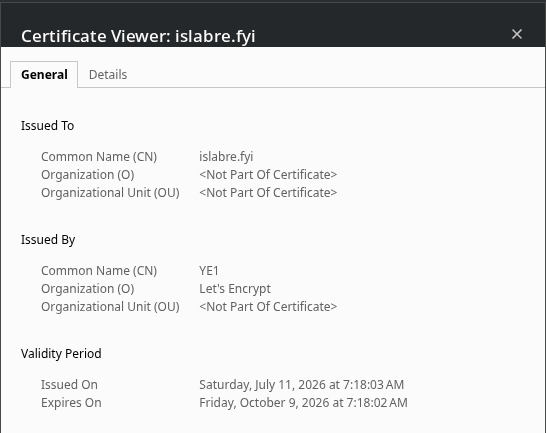
Seems like we're done!